
What is GetCalendario?
Updated 9 October 2026
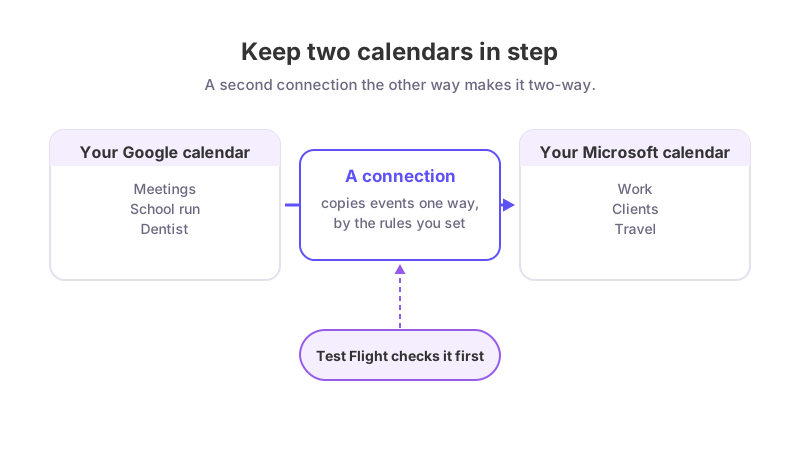
GetCalendario keeps your calendars in step. You connect your Google and Microsoft calendar accounts, tell it which calendar should be copied to which, and it copies the events across for you. A meeting that lands on one calendar shows up on the other, so you stop double-booking yourself and stop re-typing events by hand.
It works with Google Calendar and with Microsoft calendars (Microsoft 365, Outlook.com and Exchange Online). It can also read Apple (iCloud) calendars and copy them onto Google or Microsoft; copying onto Apple is not supported yet. Other calendar types are not supported. See which calendars GetCalendario works with.
Who is it for?
- Anyone with more than one calendar. A work calendar in Microsoft 365 and a personal one in Google is the classic case. See keeping work and personal calendars in sync.
- Freelancers and consultants who work inside several clients' calendars and need one place that shows when they are busy. See avoiding double-booking across client calendars.
- Families and small teams who want a shared picture without handing out passwords. See a shared family calendar across Google and Microsoft.
- Assistants who look after someone else's calendar. See how an assistant manages an executive's calendar.
What does it do?
- Copies events between calendars. You build a connection from one calendar to another. You choose how much travels with each event: the full details, just the title, or only a block that reads Busy.
- Lets you choose what is copied. Sync rules skip events by color, keep private events private, and more. See how to stop certain events from syncing.
- Tests before it syncs. Test Flight shows you a real result on the destination calendar before the rest of your events follow. See what Test Flight does before your first sync.
- Shares a read-only view. On plans that include it, you can let someone see when you are free without giving them a login. See how to share your availability by link.
- Backs up your calendars. Daily Backups is part of the paid plans and the trial. See how Daily Backups work.
What does it not do?
Being plain about this saves you a wasted afternoon.
- Google and Microsoft calendars, and Apple as a source only. You can sync from an Apple (iCloud) calendar, not to one yet. Other calendar types are not supported.
- One direction per connection. A connection copies events one way, from a source calendar to a destination calendar. For both calendars to show each other's events you need two connections. See one-way or two-way calendar sync.
- It does not copy the guest list. Attendees are not copied onto synced events, Attendees are not copied onto synced events, so the copies do not invite anyone.
- It only looks at a window of time. Each plan sets how far back and ahead events are copied. See how far back and forward does calendar sync go.
- No single sign-on or directory sync. You sign in with your own account, and you invite people to your team by email, one at a time or from a CSV list.
How does it cost?
Every new account gets 14 days with Premium limits and no card needed. After that it moves to the Free plan unless you choose a paid one; connections beyond what Free allows are paused, not deleted. Free keeps two accounts connected with one connection between them. See the 14-day trial and the Free plan and GetCalendario plans compared.
Where next?
Ready to try it? Follow get started in ten minutes. Not sure which help section you need? See which part of the docs do I need. For the reasoning behind the product, read why GetCalendario.