
One-way or two-way calendar sync: which do you need?
Updated 4 October 2026
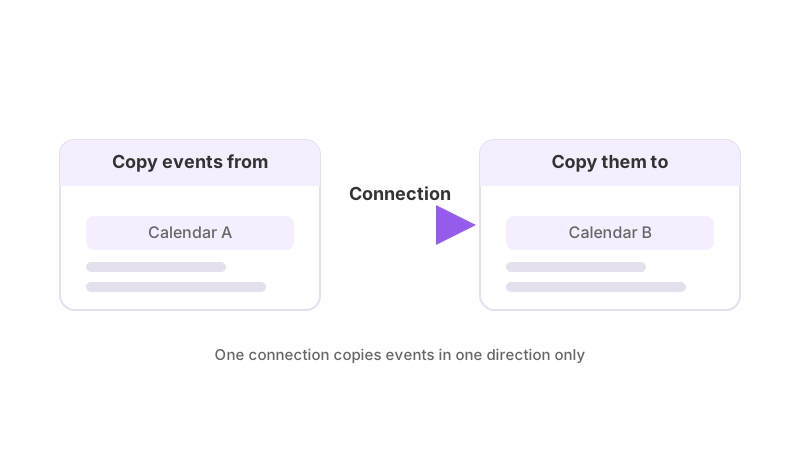
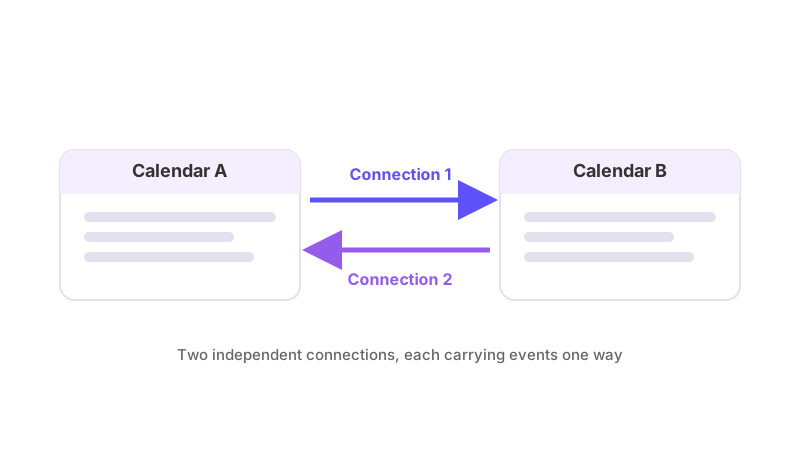
Every connection in GetCalendario copies events in one direction: from a source calendar to a destination calendar. There is no two-way switch. If you want events to travel both ways between two calendars, you create two connections, one in each direction, and both count against your plan's connection limit.
The plan feature list says it the same way: "One connection is a single sync from one calendar to another. Syncing two calendars in both directions uses two."
Which one do you need?
Choose one connection when only one calendar needs to know about the other:
- Your work calendar should block time on your personal calendar, but your personal calendar does not need to block your work one.
- A client calendar feeds a calendar you look at, and nobody edits the copy.
- You want a read-only picture of one calendar on another.
Choose two connections when both calendars need to show each other's events: you want a work meeting to block your personal calendar and a dentist appointment on your personal calendar to block your work one. The two connections are independent. Each has its own detail setting, its own rules, its own pause switch and its own Test Flight check, so changing one never changes the other.
How to set up two-way calendar sync walks through building the pair.
What does two-way cost against your plan?
Each direction uses one connection. The connection limits on the plans are:
| Plan | Connections | Two-way pairs that fit |
|---|---|---|
| Free | 1 | none (one direction only) |
| Basic | 2 | 1 |
| Premium | 12 | 6 |
| Pro | 30 | 15 |
New signups get 14 days with Premium limits and no card, then drop to the Free plan. A pair also needs both calendars to be on connected accounts; the account limit is separate (Free allows 2 accounts). See billing and plans for details on what each plan includes.
If you have more connections than a new plan allows, the extra ones are paused, not deleted. You can pick which one keeps running on the Subscription page; if you do not pick, the oldest connection keeps running.
What to know
- A connection from A to B and one from B to A are two connections even though they use the same two calendars.
- Chaining A to B to C also uses one connection per link.
- A rule on one connection does not protect the other direction. Add the rule to each connection if you want both to behave the same.
- Combine the two ideas freely: one calendar can be the source of several connections, and one calendar can be the destination of several.
- Deleting or pausing one connection leaves the other running.
If you are not sure which you need, start with one connection. You can add the reverse direction later without touching the first.