
What Test Flight does before your first sync
Updated 4 October 2026
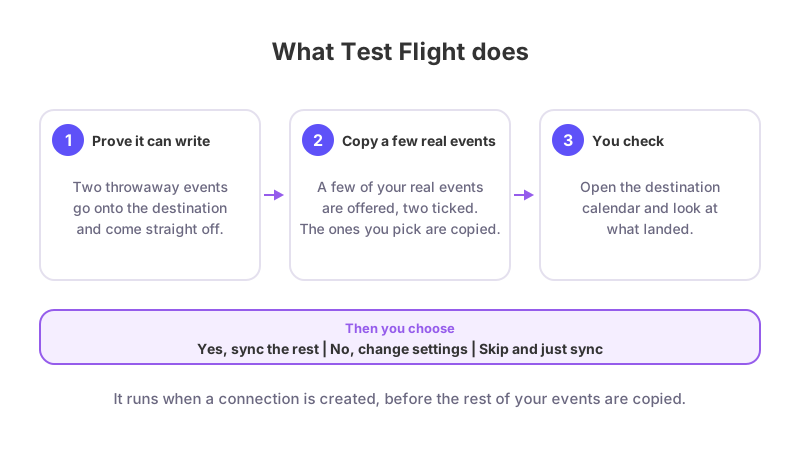
Test Flight is the check that runs when you create a new connection, before anything real syncs. It has two parts. First GetCalendario writes two throwaway events to the destination calendar and removes them straight away, to prove it can write there. Then it copies a few of your real events across so you can open the destination calendar and see exactly what lands.
Nothing else syncs until you press Yes, sync the rest or Skip and just sync.
What you see
After you save a connection you land on a screen titled "First, can we write to" followed by the destination calendar's name. It says: "We write two throwaway events and remove them straight away. Then we copy two of your real events across and tell you where to find them, so you can see exactly what lands before anything else syncs." Press Check.
Part one: the two throwaway events
The throwaway events are titled GetCalendario1-Test1 and GetCalendario1-Test2, each 30 minutes long at noon, marked private. They exist on the destination calendar for a moment and are deleted. If a delete fails, the message tells you, and a scheduled clean-up removes them about a day later.
Part two: pick what to test with
If the first part passes, you see "Pick what to test with" with up to three upcoming events from the source calendar, taken from the next 30 days. Events with the most to show come first: notes, locations, or anything the connection changes on the way. Two are ticked for you; tick or untick to change. Each one is shown side by side: Your event and what it will read on the destination calendar.
Events that your connection's rules would refuse are never offered. Press Copy these 2 across (the count follows your selection).
Check the result
The result screen is titled "Success! We can write to" and the calendar name. It lists the copies by day, time and title and reminds you what to expect for your detail setting, for example "you should see two blocks reading Busy, with nothing in them" or "you should see full copies, notes and locations included". Open the destination calendar and look. Then choose:
- Yes, sync the rest: the rehearsal copies are removed and the connection starts its real first sync.
- No, change settings: the copies are removed and you return to the connection's settings.
- Try different events: removes the copies and takes you back to the picker.
Skipping
Skip and just sync appears at the bottom of every Test Flight screen. It removes any rehearsal copies and starts syncing. If you walk away without choosing, a scheduled clean-up removes them about a day later.
What if it does not pass?
- "We could not write to" the calendar: the message under the heading is the reason given by the provider. Press Try again or Back to settings. If the account itself is the problem, see Why is my calendar not syncing.
- "That did not look right on" the calendar: the copy step failed. Anything that landed is cleaned up. Press Try again.
- "Nothing to test with": no upcoming events in the next 30 days, or your rules excluded everything. You can press Sync anyway or go back to settings.
- "A check is already running for this connection. Give it a moment and try again.": another tab is already running it.
What to know
Test Flight only copies the few events you pick, not everything. See one-way or two-way for how connections work, and how far back and forward sync goes for what the real sync covers.