
How long until a new event appears on the other calendar?
Updated 9 October 2026
How quickly a new event shows up on the other calendar depends mainly on how quickly Google or Microsoft tells GetCalendario about it. Usually the change is picked up when the provider sends a notification. A scheduled sweep catches anything that notification missed. GetCalendario does not promise a fixed delay, and you should not plan around one.
What starts a sync?
Three things can make GetCalendario look at a calendar again:
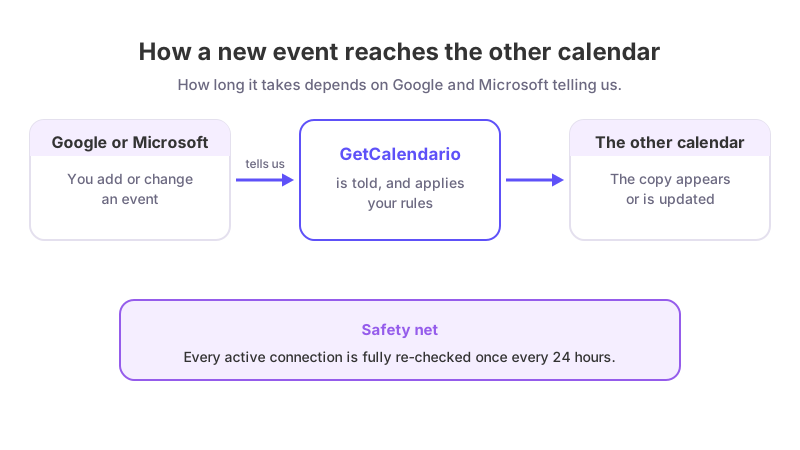
- A change notification from Google or Microsoft. When a connection starts, GetCalendario asks the provider to notify it when events change on that connection's source calendar. When a notification arrives, GetCalendario fetches what changed and applies your connections to it. How soon the notification arrives is up to Google and Microsoft.
- A daily full re-check of each connection. Every active connection is fully re-synced once every 24 hours. The schedule runs hourly and picks up the connections created in that hour of the day, so a connection created at 14:20 is re-checked at around 14:00 each day, spreading the work across the day. This is the safety net if a notification never arrived.
- When a connection starts. After you pass or skip Test Flight, the connection runs a first sync of the events inside the window.
The permission that lets Google or Microsoft keep notifying us is renewed on a schedule too: an hourly job renews Google watches and Microsoft subscriptions, and a nightly clean-up removes orphaned ones. If one lapses and is not renewed, the daily re-check still covers it.
Which events does it look at?
Only events inside your plan's sync window. On Free that is 7 days back and 30 days ahead. An event outside the window is not evaluated until it moves inside it. See how far back and forward does calendar sync go.
What about Apple calendars?
Apple does not notify anyone when an iCloud calendar changes, so GetCalendario checks each Apple account on a schedule instead. How often depends on your plan:
| Plan | Apple calendars checked |
|---|---|
| Basic | every 30 minutes |
| Premium and the trial | every 15 minutes |
| Pro and Teams | every 5 minutes |
So a change on an Apple calendar is picked up within 5 to 30 minutes, depending on your plan, and then copied like any other change. The Free plan cannot connect Apple.
So what is a typical delay?
We cannot state one from how the system is built, because it depends on when Google and Microsoft send their notifications, and on how many events are waiting to be processed. What we can say is the worst case for a missed notification: the connection's daily re-check will find the event.
If an event is still missing
- Check the event is inside your sync window.
- Check no sync rule excludes it (a color, keyword or private-event rule).
- Check the connection is not paused and its account is not showing Reconnect on Home.
- If it has been more than a day, follow Why is my calendar not syncing.